Patent prosecution for AI
Give your AI the file wrapper.
Connect PatentReply to Claude, ChatGPT, Grok, or another supported AI. Give your AI a U.S. application number, and PatentReply retrieves the prosecution record from the USPTO, reads and organizes the claims, Office Actions, responses, cited references, and prosecution history, and gives your AI a structured, source-linked record of the case.
No downloading, organizing, or uploading a pile of PDFs.
Works with Claude · ChatGPT · Grok · other MCP clients
One new public application a month, free. No card.
Connect once, then just ask.
Connect PatentReply to Claude, ChatGPT, Grok, or another supported AI client you already use. Then just give it a U.S. application number. PatentReply gives your AI a structured, source-linked record of the prosecution to work from.
01
Connect PatentReply
Add the connector, approve the sign-in. Once.
02
Give your AI the application number
“Open application 18/494,010.”
03
PatentReply builds the prosecution record
Behind the conversation, PatentReply retrieves the file wrapper from the USPTO, reads and organizes the record, and links the underlying sources. Most first builds take a few minutes. Larger prosecution histories may take a little longer.
04
Talk through the case
Ask questions, explore arguments, review claims, or develop a response—just as you would with an associate who already knows the prosecution history. PatentReply keeps the structured, source-linked record behind the conversation, so your AI can work from the actual file wrapper as you talk.
A structured file wrapper, not a pile of PDFs.
Uploading PDFs gives your AI documents. PatentReply gives it the prosecution history behind them.
With a normal upload, you choose which documents to include—and usually leave much of the file wrapper behind. The AI then has to infer how those documents relate: which claim version was pending, what changed in each response, which rejections were overcome, and what the examiner is still maintaining.
PatentReply builds that history into the matter. Claims, amendments, Office Actions, responses, references, and prosecution events are organized in sequence and linked back to their sources. Your AI works from the record instead of reconstructing it from a stack of documents.
Upload the PDFs
Documents in a conversation
- You decide which documents to upload, so important context may be missing
- The AI has to infer which claim versions, rejections, and arguments belong together
- Earlier prosecution history can easily be overlooked or misunderstood
- The model may confidently draw the wrong connection between documents
- The documents live in that conversation
- A new chat or a different AI means uploading them again
- New prosecution is missing until you manually add it
The PatentReply Approach
A structured prosecution record
- The file wrapper is automatically gathered from the USPTO, not assembled document by document
- Claims, amendments, rejections, arguments, references, and events are connected across the prosecution history
- Your AI can see which claims were pending at a particular time and how they changed
- It can see what was previously argued, what was overcome, and what remains at issue
- The underlying sources stay available for verification
- The same matter can be opened from any supported AI
- Refreshing the matter adds later prosecution to the existing history
Check its work.
The AI gives you the answer. PatentReply shows you where it came from.
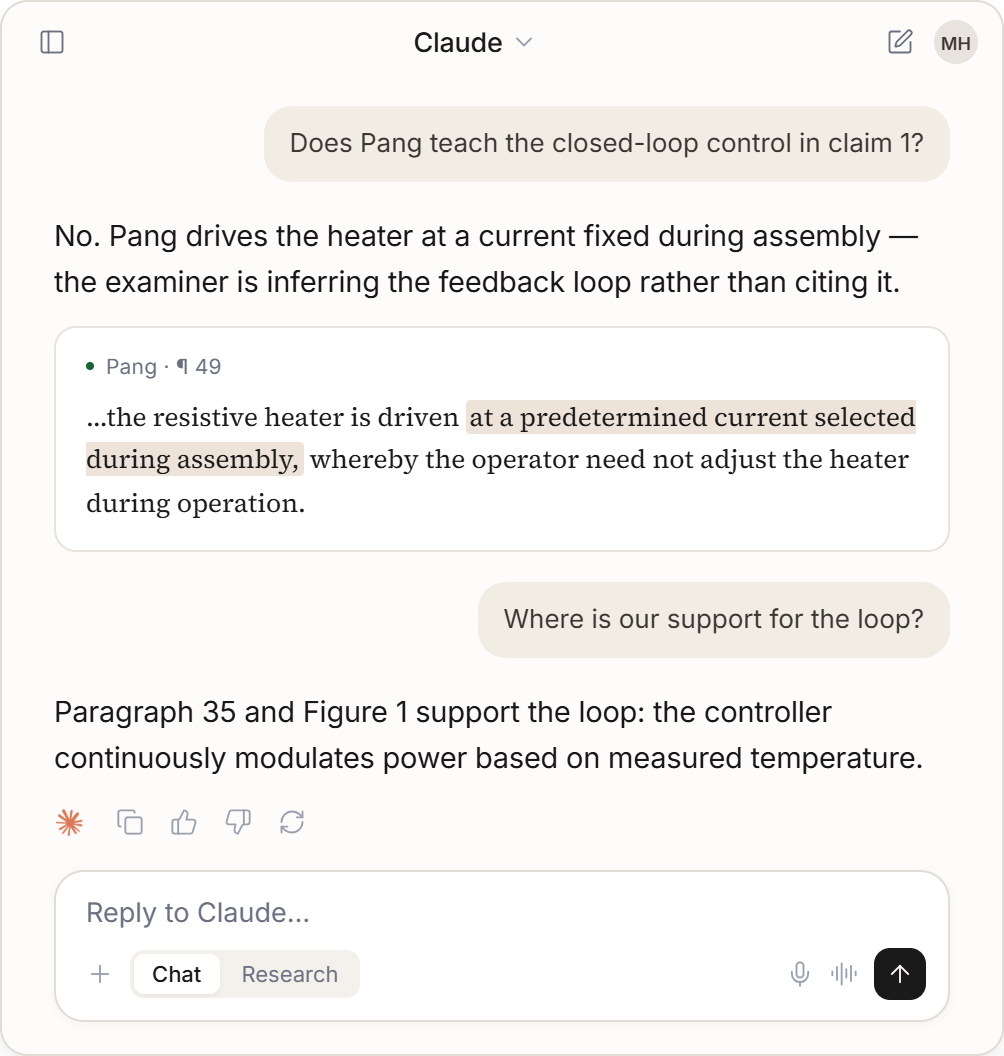
§103 rejectionClaims 1–2, 9–10, 19–20Hung in view of Lundgrenmatter 18/494,010
Cited reference
Lundgren ¶ 0025
…a first detector and a third detector that measure the intensity of green light that is received through the respective green…
US 2020/0322581
Cited reference
Hung ¶ 0070
…The first sensor 20 automatically switches between the IR mode and the RGB mode based on a light intensity of environment…
US 2023/0166661 A1
Office Action
Motivation to combine
…whereby HUNG is directed towards green light intensity considerations…
doc MMM1RFEO143X139 · Mar 12, 2026
How solid was the §103 on claim 1?
Used PatentReply integration
Lundgren ¶ 25 measures green light per pixel.
Hung ¶ 70 does switch imaging modes on light intensity.
The motivation says Hung is ‘directed towards green light intensity’.
Every ground was withdrawn at allowance.
§103 rejection · Claims 1–2, 9–10, 19–20 · Hung in view of Lundgren· 18/494,010
Lundgren ¶ 0025 · Cited reference
measure the intensity of green light
US 2020/0322581
Hung ¶ 0070 · Cited reference
automatically switches between the IR mode and the RGB mode based on a light intensity of environment
US 2023/0166661 A1
Motivation to combine · Office Action
HUNG is directed towards green light intensity considerations
doc MMM1RFEO143X139 · Mar 12, 2026
Examiner relies on
Lundgren ¶ 0025
for the green-light element the action says Hung lacks
As used herein, “spectral qualities” of an image include associations of frequency ranges with the pixels of the image. For example, a traditional Bayer-type mosaic filter has a 2×2 filter pattern with two green filters, one red filter, and one blue filter, so that a 2×2 group of detectors aligned with the filter pattern includes a first detector and a third detector that measure the intensity of green light that is received through the respective green filters, a second detector that measures the intensity of red light that is received through the red filter, and fourth detector that measures the intensity of blue light that is received through the blue filter. …
The paragraph defines a Bayer filter: two detectors in every four measure green light, pixel by pixel. The claim quantifies green light for a frame. Whether one supports the other is your judgment.
One file wrapper. Across the patent lifecycle.
The prosecution record stays with the matter and grows as the case evolves. Use it from your preferred AI for Office Action responses, allowance review, continuation strategy, claim analysis, and more.
01Office Action response
“What is the strongest response to this §103 rejection?”
02Allowance review
“Review the allowed claims and what we gave up to get them.”
03Continuation strategy
“Review the family and propose continuation claims that recover the scope we conceded.”
04Prosecution history
“What have we said on the record that could narrow claim 1 later?”
05Claim construction
“What does the intrinsic record say about the scope of ‘image processing pipeline’?”
06Litigation prep
“Chart claim 1 element by element, with the prosecution history that constrains each one.”
Just ask. PatentReply keeps the record behind the conversation.
One file wrapper. Any AI you use.
Switch chats or switch AI clients. Do not rebuild the case.
Claude
18/494,010
ChatGPT
18/494,010
Grok
18/494,010
PatentReply
18/494,010 · record checked Sep 1, 2026
One compiled file wrapper
- Every paper in the wrapper
- Claim and amendment history
- Cited art, addressable by paragraph
- Sources, strategy, approvals, and drafts
- Claude18/494,010
- ChatGPT18/494,010
- Grok18/494,010
PatentReply
18/494,010 · record checked Sep 1, 2026
One compiled file wrapper
- Every paper in the wrapper
- Claim and amendment history
- Cited art, addressable by paragraph
- Sources, strategy, approvals, and drafts
Across AI clients
Start in Claude. Continue in ChatGPT tomorrow. Both open the same current matter; neither rebuilds it.
Across time
When a new Office Action or other prosecution event arrives, refresh the matter. 18/494,010 was rejected in March 2026 and allowed in July; the Notice of Allowance joined the same record, and the grounds it withdrew stay readable — same matter, extended.
You make the legal decisions.
Your AI can investigate the file wrapper, test arguments, and develop strategy. PatentReply keeps the patent professional in the loop at the decisions that matter.
When a response strategy is ready, you see the proposed approach and the evidence supporting it before you approve it. The same is true before a draft response is treated as ready to move forward.
How would you respond to the §103?
Used PatentReply integration
I would traverse the §103 on its motivation to combine: the ground says Hung does not disclose the green-light element, and the motivation says Hung is directed towards green light intensity considerations. Here is the plan, with the record passage behind each argument.
Used PatentReply integration
The response strategy is saved and ready for your approval. Review and approve it on patentreply.ai — approval isn’t accepted inside the chat.
Draft the response using the approved strategy.
18/494,010 at its March 12, 2026 action — the §103 the examiner later withdrew.
The AI can research, reason, and recommend. You decide.
PatentReply does not file papers with the USPTO, compute response deadlines, or give legal advice. You remain the practitioner of record.
Connects through MCP.
PatentReply makes the same file wrapper and workflow available to supported AI clients through one secure connection: OAuth sign-in, no API keys, no training on your matters, and the documents you add stay private. There is no chat on patentreply.ai — the site holds your matters, approvals, and billing.
Try it on an actual case.
Connect PatentReply, then tell your AI an application number. One public application each month is free, no card.
“Open application [your application number].”
Free
$0 every month
Connect PatentReply and compile your first case. Your account is created when you approve the sign-in.
- One new public matter every month
- Works in Claude, ChatGPT, Grok, and other supported AI clients
- Answers linked to the record
Patent Professional
$59 / seat / month
Keep your matters current and work them from your AI.
- 3 new matters per month per seat; additional new matters $19 each
- Office Action response workflow and filing-ready drafts
- Attorney approval gates and signed downloads
- Private and unpublished documents
A matter is one U.S. application. Compiling it uses one, once, in the month you first do; refreshing or returning to it never does.
Give your AI the file wrapper.
Works with Claude · ChatGPT · Grok · other supported MCP clients